转载:Spring MVC +MyBatis +MySQL 登录查询Demo
忙活了大半天,饭也没顾得上吃,哎许久不动手,一动手就出事,下面请看今天的重头戏,额吃个饭回来再发了!
1.整体结构
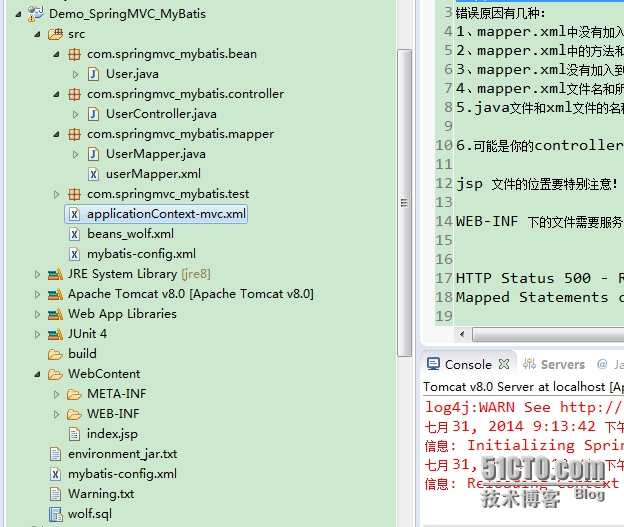
2.准备工作
数据库:
--Mysql 5.6
创建数据库 wolf
1
CREATE DATABASE wolf;
创建用户表 user
1
2
3
4
5
6
create table user(
id int AUTO_INCREMENT primary key,
name varchar(25) not null,
pwd varchar(20) not null,
create_time date
)
向表中插入测试数据
1
2
3
4
insert into user(name,pwd,create_time) values("wangxin","123","2014-02-14");
insert into user(name,pwd,create_time) values("Tom","123456","2014-02-14");
insert into user(name,pwd,create_time) values("Jack","123","2014-02-14");
insert into user(name,pwd,create_time) values("Bob","123","2014-02-14");
所需Jar包
我们先文字,后图吧 ,细心的你,看完所有内容会发现,这里的东西在哪里也有哦,别想多了,肯定在这里,你猜猜猜..

jar:
1.驱动:mysql-connector-java-5.1.7-bin.jar
2.jstl 的
jstl.jar
standard.jar
3.spring 的
spring-aop-4.0.0.M2.jar
spring-beans-4.0.0.M2.jar
spring-context-4.0.0.M2.jar
spring-core-4.0.0.M2.jar
(若出现问题,可以替换 spring-core-4.0.0.RELEASE.jar)
spring-expression-4.0.0.M2.jar
spring-jdbc-4.0.0.M2.jar
spring-test-4.0.0.M2.jar
spring-tx-4.0.0.M2.jar
4.mybatis 的
mybatis-3.1.1.jar
log4j-1.2.16.jar
mybatis-spring-1.2.1.jar
5.以及spring-depend
aopalliance-1.0.jar
cglib-nodep-2.1_3.jar
commons-logging-1.1.1.jar
6.web 相关的
spring-web-4.0.0.RELEASE.jar
spring-webmvc-4.0.0.RELEASE.jar
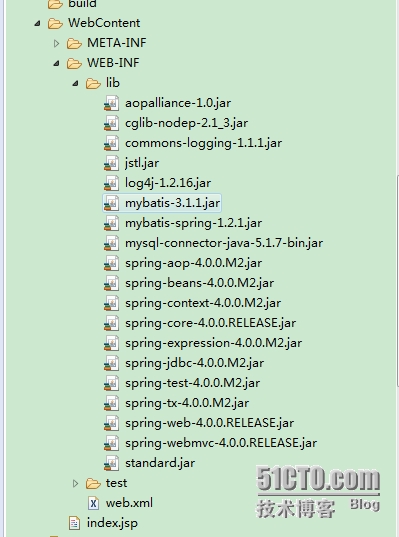
下面是jar包在项目中的结构图
3.项目代码及简析
Bean类
User.java
1
2
3
4
5
6
7
8
9
10
11
12
13
14
15
16
17
18
19
20
21
22
23
24
25
26
27
28
29
30
31
32
33
34
35
36
37
38
39
40
41
42
43
44
45
46
47
48
49
50
51
52
53
54
55
56
57
58
59
60
61
62
63
64
65
66
67
68
69
70
71
72
package com.springmvc_mybatis.bean;
import java.io.Serializable;
import java.util.Date;
import org.springframework.format.annotation.DateTimeFormat;
public class User implements Serializable {
private static final long serialVersionUID = 1L;
private Integer id;
private String name;
private String password;
@DateTimeFormat(pattern = "yyyy-MM-dd")
private Date time;
public User() {
super();
}
public User(String name, String password) {
super();
this.name = name;
this.password = password;
}
public User(Integer id, String name, String password, Date time) {
super();
this.id = id;
this.name = name;
this.password = password;
this.time = time;
}
public Integer getId() {
return id;
}
public void setId(Integer id) {
this.id = id;
}
public String getName() {
return name;
}
public void setName(String name) {
this.name = name;
}
public String getPassword() {
return password;
}
public void setPassword(String password) {
this.password = password;
}
public Date getTime() {
return time;
}
public void setTime(Date time) {
this.time = time;
}
@Override
public String toString() {
return "User [id=" + id + ", name=" + name + ", password=" + password
+ ", time=" + time + "]";
}
}
接口(如果你用了mappers 那么接口以及配置文件最后都带有Mapper,且名字一致)
UserMapper.java
1
2
3
4
5
6
7
8
9
10
11
12
13
14
package com.springmvc_mybatis.mapper;
import java.util.List;
import org.apache.ibatis.annotations.Param;
import com.springmvc_mybatis.bean.User;
//userMapper只能传入一个参数,多个的话需要注解
public interface UserMapper {
// value 必须与Bean 属性一致!
User login(@Param(value = "name") String name,
@Param(value = "password") String password);
List<User> getAllUsers();
}
UserMapper.xml
1
2
3
4
5
6
7
8
9
10
11
12
13
14
15
16
17
18
19
20
21
22
23
<?xml version="1.0" encoding="UTF-8" ?>
<!DOCTYPE mapper PUBLIC "-//mybatis.org//DTD Mapper 3.0//EN" "http://mybatis.org/dtd/mybatis-3-mapper.dtd">
<mapper namespace="com.springmvc_mybatis.mapper.UserMapper">
<resultMap type="User" id="userResult">
<result column="id" property="id" />
<result column="name" property="name" />
<result column="pwd" property="password" />
<result column="create_time" property="time" />
</resultMap>
<select id="login" resultMap="userResult">
select * from
user
where
name=#{name}
and pwd=#{password}
</select>
<select id="getAllUsers" resultMap="userResult">
select *
from user
</select>
</mapper>
<!-- error ,,,,resultMap wrong to resultType... -->
下面该干嘛了?╮(╯▽╰)╭好吧,我们先来配置下在木有服务器的环境下,看看Mybatis是否能正确运行。
所以我们先来配置哪个呢?
哦是她,
spring 配置
beans_wolf.xml 哈哈,wolf 哦,够那个啥吧。。。
1
2
3
4
5
6
7
8
9
10
11
12
13
14
15
16
17
18
19
20
21
22
23
24
25
26
27
28
29
30
31
32
33
34
35
36
37
38
39
40
41
42
43
44
45
46
47
48
<?xml version="1.0" encoding="UTF-8"?>
<beans xmlns="http://www.springframework.org/schema/beans"
xmlns:xsi="http://www.w3.org/2001/XMLSchema-instance"
xmlns:p="http://www.springframework.org/schema/p"
xmlns:context="http://www.springframework.org/schema/context"
xmlns:tx="http://www.springframework.org/schema/tx"
xsi:schemaLocation="
http://www.springframework.org/schema/beans
http://www.springframework.org/schema/beans/spring-beans-3.2.xsd
http://www.springframework.org/schema/context
http://www.springframework.org/schema/context/spring-context-3.2.xsd
http://www.springframework.org/schema/tx
http://www.springframework.org/schema/tx/spring-tx-3.2.xsd">
<!-- 1. 数据源 : DriverManagerDataSource -->
<bean id="datasource" class="org.springframework.jdbc.datasource.DriverManagerDataSource">
<property name="driverClassName" value="com.mysql.jdbc.Driver"/>
<property name="url" value="jdbc:mysql://localhost:3307/wolf"/>
<property name="username" value="root"/>
<property name="password" value="root"/>
</bean>
<!--
2. mybatis的SqlSession的工厂: SqlSessionFactoryBean
dataSource / typeAliasesPackage
-->
<bean id="sqlSessionFactory" class="org.mybatis.spring.SqlSessionFactoryBean">
<property name="dataSource" ref="datasource"/>
<property name="typeAliasesPackage" value="com.springmvc_mybatis.bean"/>
<property name="configLocation" value="classpath:mybatis-config.xml" />
</bean>
<!--
3. mybatis自动扫描加载Sql映射文件 : MapperScannerConfigurer
sqlSessionFactory / basePackage
-->
<bean class="org.mybatis.spring.mapper.MapperScannerConfigurer">
<property name="basePackage" value="com.springmvc_mybatis.mapper"/>
<property name="sqlSessionFactory" ref="sqlSessionFactory"/>
</bean>
<!-- 4. 事务管理 : DataSourceTransactionManager -->
<bean id="manager" class="org.springframework.jdbc.datasource.DataSourceTransactionManager">
<property name="dataSource" ref="datasource"/>
</bean>
<!-- 5. 使用声明式事务 -->
<tx:annotation-driven transaction-manager="manager" />
</beans>
Spring 基本配置都在上面咯,数据库如果想读入配置文件的话,自己新建属性文件配置下下了
哦,差点过了,现在我们就可以来测试下咯,后面的mvc配置主要是为web服务的哈,不急!!
TestSimpleMyBatis.java
1
2
3
4
5
6
7
8
9
10
11
12
13
14
15
16
17
18
19
20
21
22
23
24
25
26
27
28
29
30
31
32
33
34
35
36
37
38
39
40
41
package com.springmvc_mybatis.test;
import java.util.List;
import org.junit.Test;
import org.junit.runner.RunWith;
import org.springframework.beans.factory.annotation.Autowired;
import org.springframework.test.context.ContextConfiguration;
import org.springframework.test.context.junit4.SpringJUnit4ClassRunner;
import com.springmvc_mybatis.bean.User;
import com.springmvc_mybatis.mapper.UserMapper;
@RunWith(SpringJUnit4ClassRunner.class)
@ContextConfiguration("/beans_wolf.xml")
public class TestSimpleMyBatis {
@Autowired
private UserMapper userMapper;
@Test
public void findAll() {
List<User> users = userMapper.getAllUsers();
System.out.println(users);
}
@Test
public void login() {
// User user = new User(null, "wx", "123456", new Date());
// User user = new User(null, "wangxin", "123456", new Date());
// User loginExit = userMapper.login(user);
// User loginExit = userMapper.login("wx", "123456");
User loginExit = userMapper.login("wangxin", "123456");
if (loginExit == null) {
System.out.println("用户不存在");
} else {
System.out.println(loginExit);
System.out.println("登录成功!");
}
}
}
如果你成功了,恭喜你可以继续咯!如果出现问题那么尝试在配置一个哈,
mybatis-config.xml,特意把她放到下下个咯,就看你细心嘛
Let`s go...
applicationContext-mvc.xml
1
2
3
4
5
6
7
8
9
10
11
12
13
14
15
16
17
18
19
20
21
22
23
24
<?xml version="1.0" encoding="UTF-8"?>
<beans xmlns="http://www.springframework.org/schema/beans"
xmlns:xsi="http://www.w3.org/2001/XMLSchema-instance" xmlns:context="http://www.springframework.org/schema/context"
xmlns:mvc="http://www.springframework.org/schema/mvc"
xsi:schemaLocation="
http://www.springframework.org/schema/beans http://www.springframework.org/schema/beans/spring-beans-3.0.xsd
http://www.springframework.org/schema/context http://www.springframework.org/schema/context/spring-context-3.0.xsd
http://www.springframework.org/schema/mvc http://www.springframework.org/schema/mvc/spring-mvc-3.0.xsd">
<!-- Scans the classpath of this application for @Components to deploy as
beans -->
<context:component-scan base-package="com.springmvc_mybatis.controller" />
<!-- Configures the @Controller programming model -->
<mvc:annotation-driven />
<!-- Resolves view names to protected .jsp resources within the /WEB-INF/views
directory -->
<bean id="viewResolver"
class="org.springframework.web.servlet.view.InternalResourceViewResolver">
<property name="prefix" value="/WEB-INF/test/" />
<property name="suffix" value=".jsp" />
</bean>
</beans>
mybatis-config.xml
1
2
3
4
5
6
7
8
9
10
11
12
13
14
15
16
17
18
<?xml version="1.0" encoding="UTF-8" ?>
<!DOCTYPE configuration
PUBLIC "-//mybatis.org//DTD Config 3.0//EN"
"http://mybatis.org/dtd/mybatis-3-config.dtd">
<configuration>
<!-- Spring整合myBatis后,这个配置文件基本可以不要了 -->
<!-- 设置外部配置文件 -->
<!-- 设置类别名 -->
<typeAliases>
<typeAlias type="com.springmvc_mybatis.bean.User" alias="User" />
</typeAliases>
<!-- 设置数据库连接环境 -->
<!-- 映射文件 -->
<mappers>
<mapper resource="com/springmvc_mybatis/mapper/userMapper.xml" />
</mappers>
</configuration>
到此配置工作基本完成了,为了页面数据提交和查找,再弄个Handler吧,这个也可以叫做Controller吧,反正都是流程数据处理的哈
UserController.java
1
2
3
4
5
6
7
8
9
10
11
12
13
14
15
16
17
18
19
20
21
22
23
24
25
26
27
28
29
30
31
32
33
34
35
36
37
38
39
40
41
42
43
44
45
46
package com.springmvc_mybatis.controller;
import java.util.List;
import javax.servlet.http.HttpServletRequest;
import org.springframework.beans.factory.annotation.Autowired;
import org.springframework.stereotype.Controller;
import org.springframework.ui.Model;
import org.springframework.web.bind.annotation.RequestMapping;
import com.springmvc_mybatis.bean.User;
import com.springmvc_mybatis.mapper.UserMapper;
@Controller
@RequestMapping("/user")
public class UserController {
@Autowired
private UserMapper usermapper;
@RequestMapping("/login")
public String login(HttpServletRequest request, Model model) {
String name = request.getParameter("username");
String password = request.getParameter("password");
System.out.println("login");
User user_login = usermapper.login(name, password);
System.out.println(user_login);
if (user_login == null) {
System.out.println("Error login!");
return "fail";
} else {
model.addAttribute("user", user_login);
return "success";
}
}
@RequestMapping("/list")
public String getAllUsers(Model model) {
List<User> users = usermapper.getAllUsers();
model.addAttribute("users", users);
System.out.println(users);
return "list";
}
}
下面我们该弄什么咯???
前端显示了,当然是。
先给出结构图吧,挺简单的!
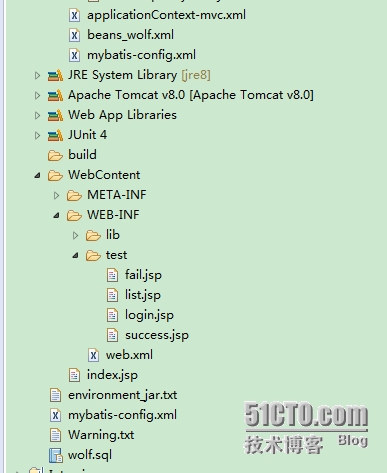
你,你,看到了神马 ,jre8,Tomcat 8 ,

神啊,你未来来的吧,我还在5,啊,6啊,7都少用,你都,,,,,
WEB
index.jsp
1
<jsp:forward page="/WEB-INF/test/login.jsp"></jsp:forward>
 这么长啊,我的神。。。
login.jsp
1
2
3
4
5
6
7
8
9
10
11
12
13
14
15
16
17
18
19
20
21
22
23
24
25
26
<%@ page language="java" contentType="text/html; charset=UTF-8"
pageEncoding="UTF-8"%>
<!DOCTYPE html PUBLIC "-//W3C//DTD HTML 4.01 Transitional//EN" "http://www.w3.org/TR/html4/loose.dtd">
<html>
<head>
<meta http-equiv="Content-Type" content="text/html; charset=UTF-8">
<title>login</title>
</head>
<body>
<form action="user/login.action" method="post">
<table align="left">
<tr>
<td>用户名:</td>
<td><input id="userName" type="text" name="username"></td>
</tr>
<tr>
<td>密码:</td>
<td><input id="password" type="password" name="password"></td>
</tr>
<tr>
<td><button type="submit" name="Submit">登录</button></td>
</tr>
</table>
</form>
</body>
</html>
success.jsp 登录成功
1
2
3
4
5
6
7
8
9
10
11
12
13
14
15
16
<%@ page language="java" contentType="text/html; charset=UTF-8"
pageEncoding="UTF-8"%>
<!DOCTYPE html PUBLIC "-//W3C//DTD HTML 4.01 Transitional//EN" "http://www.w3.org/TR/html4/loose.dtd">
<html>
<head>
<meta http-equiv="Content-Type" content="text/html; charset=UTF-8">
<title>Success</title>
</head>
<body>
Welcome
<font color="red">${requestScope.user.name} </font>!
<br>
<br>
<a href="list.action">用户信息列表</a>
</body>
</html>
fail.jsp
1
2
3
4
5
6
7
8
9
10
11
12
13
14
15
16
17
18
<%@ page language="java" contentType="text/html; charset=UTF-8"
pageEncoding="UTF-8"%>
<!DOCTYPE html PUBLIC "-//W3C//DTD HTML 4.01 Transitional//EN" "http://www.w3.org/TR/html4/loose.dtd">
<html>
<head>
<meta http-equiv="Content-Type" content="text/html; charset=UTF-8">
<title>Insert title here</title>
</head>
<body>
<h3>
<font color="red">fail login!</font>
</h3>
<h2>
<a href="${pageContext.request.contextPath}">return the Login
Page!</a>
</h2>
</body>
</html>
list.jsp
1
2
3
4
5
6
7
8
9
10
11
12
13
14
15
16
17
18
19
20
21
22
23
24
25
26
27
28
29
30
31
32
33
34
35
36
37
38
39
40
41
42
43
44
45
46
47
48
<%@ page language="java" contentType="text/html; charset=UTF-8"
pageEncoding="UTF-8"%>
<%@ taglib prefix="c" uri="http://java.sun.com/jsp/jstl/core"%>
<%@taglib prefix="fmt" uri="http://java.sun.com/jsp/jstl/fmt"%>
<%@taglib prefix="spring" uri="http://www.springframework.org/tags"%>
<!DOCTYPE html PUBLIC "-//W3C//DTD HTML 4.01 Transitional//EN" "http://www.w3.org/TR/html4/loose.dtd">
<html>
<head>
<meta http-equiv="Content-Type" content="text/html; charset=UTF-8">
<title>Insert title here</title>
</head>
<body>
<c:if test="${empty requestScope.users }">
<font color="red">没有员工信息!</font>
</c:if>
<c:if test="${!(empty requestScope.users)}">
<table border="1" cellpadding="10" cellspacing="0">
<tr>
<th>Num</th>
<th>Id</th>
<th>Name</th>
<th>Create_Time</th>
<th>Password</th>
<th colspan="2">OP</th>
</tr>
<c:forEach items="${requestScope.users }" var="user" varStatus="s">
<tr>
<td>${s.count}</td>
<td>${user.id}</td>
<td>${user.name }</td>
<td><fmt:formatDate value="${user.time}" pattern="yyyy-MM-dd" />
</td>
<td>${user.password}</td>
<td><a onclick="return false"
href="${pageContext.request.contextPath}/user/save.action?id=${user.id}"><font
color="blue">edit</font></a></td>
<td><a onclick="return false"
href="${pageContext.request.contextPath}/user/delete/${user.id}.action"><font
color="blue">delete</font></a></td>
</tr>
</c:forEach>
</table>
</c:if>
<br>
<a href="${pageContext.request.contextPath}">goto login</a>
</body>
</html>
页面终于完蛋了,,但是能运行吗????????
好像少了个吧
web.xml
1
2
3
4
5
6
7
8
9
10
11
12
13
14
15
16
17
18
19
20
21
22
23
24
25
26
27
<?xml version="1.0" encoding="UTF-8"?>
<web-app xmlns:xsi="http://www.w3.org/2001/XMLSchema-instance"
xmlns="http://java.sun.com/xml/ns/javaee"
xsi:schemaLocation="http://java.sun.com/xml/ns/javaee http://java.sun.com/xml/ns/javaee/web-app_2_5.xsd"
id="WebApp_ID" version="2.5">
<display-name>Demo_SpringMVC_MyBatis</display-name>
<context-param>
<param-name>contextConfigLocation</param-name>
<param-value>classpath:beans_wolf.xml</param-value>
</context-param>
<listener>
<listener-class>org.springframework.web.context.ContextLoaderListener</listener-class>
</listener>
<servlet>
<servlet-name>springDispatcherServlet</servlet-name>
<servlet-class>org.springframework.web.servlet.DispatcherServlet</servlet-class>
<init-param>
<param-name>contextConfigLocation</param-name>
<param-value>classpath:applicationContext-mvc.xml</param-value>
</init-param>
<load-on-startup>1</load-on-startup>
</servlet>
<servlet-mapping>
<servlet-name>springDispatcherServlet</servlet-name>
<url-pattern>*.action</url-pattern>
</servlet-mapping>
</web-app>
至此完工了,终于!

4.其他
下面简单说下项目中的xml文件哦
XML文件
1
2
3
4
5
6
7
8
9
10
11
12
13
14
15
16
17
18
19
20
21
22
23
24
25
26
27
28
29
30
31
32
33
34
35
36
37
38
39
40
41
42
43
44
45
46
47
48
49
1.Spring基本的ApplicationContext.xml 本例中用的是 beans_wolf.xml(名字一定要注意,尽量用前面的)
配置了:
<!-- 1. 数据源 : DriverManagerDataSource -->
<!-- 2. mybatis的SqlSession的工厂: SqlSessionFactoryBean
dataSource / typeAliasesPackage -->
<!-- 3. mybatis自动扫描加载Sql映射文件 : MapperScannerConfigurer
sqlSessionFactory / basePackage /configLocation-->
<!-- 4. 事务管理 : DataSourceTransactionManager -->
<!-- 5. 使用声明式事务 -->
其中配置了数据库的具体信息,所以不在另外用属性文件了!
2.Spring MVC 的applicationContext-mvc.xml
配置了:自动扫描包,注解驱动,视图解析器
3.mybatis-config.xml 这个具体配置根据你的实际来弄!
4.web.xml
配置了:
<!-- needed for ContextLoaderListener -->
<context-param>
<param-name>contextConfigLocation</param-name>
<param-value>classpath:beans_wolf.xml</param-value>
</context-param>
<!-- Bootstraps the root web application context before servlet initialization -->
<listener>
<listener-class>
org.springframework.web.context.ContextLoaderListener
</listener-class>
</listener>
<!-- DispatcherServlet-->
<servlet>
<servlet-name>springDispatcherServlet</servlet-name>
<servlet-class>
org.springframework.web.servlet.DispatcherServlet
</servlet-class>
<init-param>
<!-- 配置 SpringMVC 配置文件的位置 -->
<param-name>contextConfigLocation</param-name>
<param-value>classpath:applicationContext-mvc.xml</param-value>
</init-param>
<load-on-startup>1</load-on-startup>
</servlet>
<servlet-mapping>
<servlet-name>springDispatcherServlet</servlet-name>
<!-- 配置什么样的请求交由 SpringMVC 处理 -->
<url-pattern>*.action</url-pattern>
</servlet-mapping>
遇到的一个很不咋地的问题
HTTP Status 500 - Request processing failed; nested exception is java.lang.IllegalArgumentException:
Mapped Statements collection does not contain value for com.springmvc_mybatis.mapper.UserMapper.login
!!!少了这个<property name="configLocation" value="classpath:mybatis-config.xml" />
1
2
3
4
5
<bean id="sqlSessionFactory" class="org.mybatis.spring.SqlSessionFactoryBean">
<property name="dataSource" ref="datasource"/>
<property name="typeAliasesPackage" value="com.springmvc_mybatis.bean"/>
<property name="configLocation" value="classpath:mybatis-config.xml" />
</bean>
网友的一些问题及解决方法。。。
1
2
3
4
5
6
7
8
Mapped Statements collection does not contain value for后面是什么类什么方法之类的:
错误原因有几种:
1、mapper.xml中没有加入namespace !!!!
2、mapper.xml中的方法和接口mapper的方法不对应 !!!
3、mapper.xml没有加入到mybatis-config.xml中(即总的配置文件),例外:配置了mapper文件的包路径的除外 !!!
4、mapper.xml文件名和所写的mapper名称不相同。 !!
5.java文件和xml文件的名称不一致 !
6.可能是你的controller 或者说是handler 有问题!!
另外:jsp 文件的位置要特别注意! index,一般在WebContent下!!!
那个xml文件出现问题一般是你的dtd约束,taglib等没弄好,自己细细品味下嘛,不知道度娘娘,实在不行在一起讨论哦!
5.完整Demo项目下载地址
 Demo_SpringMVC_MyBatis 完整登录及list查询,无错误,几经验证!共同学习!
SpringMVC MyBatis 相关jar包下载
如果无法下载,请留言索取,因为上传可能出现问题!